Posts

Good Dynamics Android Manifest File Basic Template with Xamarin

At  YARG  we develop Enterprise Apps using Xamarin with the Good Technologies GD SDK.  When creating a new Android App this is the basic Manifest file that we use, which includes the basic permissions.   <?xml version="1.0" encoding="utf-8"?> <manifest xmlns:android="http://schemas.android.com/apk/res/android" android:versionCode="1" package="com.mycompany.myapp" android:installLocation="auto" android:versionName="Version 1.0"> <uses-sdk android:minSdkVersion="17" /> <application android:label="MyApp" android:icon="@drawable/icon"> <activity android:name="com.good.gd.ui.GDInternalActivity" android:windowSoftInputMode="adjustPan"></activity> <!-- Main GD Service --> <service android:name="com.good.gd.service.GDService" android:enabled="true" android:exported="false"></service> ...

.NET Reflector replacement that's free - ILSpy

This is a replacement for .NET Reflector (which has been owned by RedGate since 2011... boooo...) ILSpy requires the .NET Framework 4.0. http://ilspy.net/

Xamarin Forms - InitializeComponent does not exist in the current context

Image
I was presented with this error whilst developing with Xamarin Forms For me it was simply down to copy and paste :-O.  I'd created a new Xaml Page, which fully qualified was MyNameSpace.MyPage. I then copied in some Xaml which had a different name in the Xaml x:Class attribute (x:Class="NotMyNameSpace.OrPage"). I then tried to compile with our fixing the x:Class attribute and got the 'InitializeComponent does not exist' error. Once I changed the Xaml to match my actual classname (x:Class="MyNameSpace.MyPage") I was back on track and the error went away. Hope this helps. For more information have a look at  forums.xamarin.com The other reason is that you may have created a Shared Xamarin Forms Project rather than a Xamarin Forms Portable project. From Craig Dunn at Xamarin (taken from  Xamarin Forms Forum ) You cannot use Xaml with the Shared Project template with iOS apps (in Xamarin Studio). It's a weird combination to rem...

Xamarin Forms - XamlParseException: No embeddedresources found

When developing with Xamarin Forms you may get the exception below when using Xaml XamlParseException: No embeddedresources found This is a known bug and for now a work around is to save the Xaml file before running/building. Have a look at this for more info: https://bugzilla.xamarin.com/show_bug.cgi?id=22019

Xamarin Android - Deployment failed. Assembly synchronization error

Image
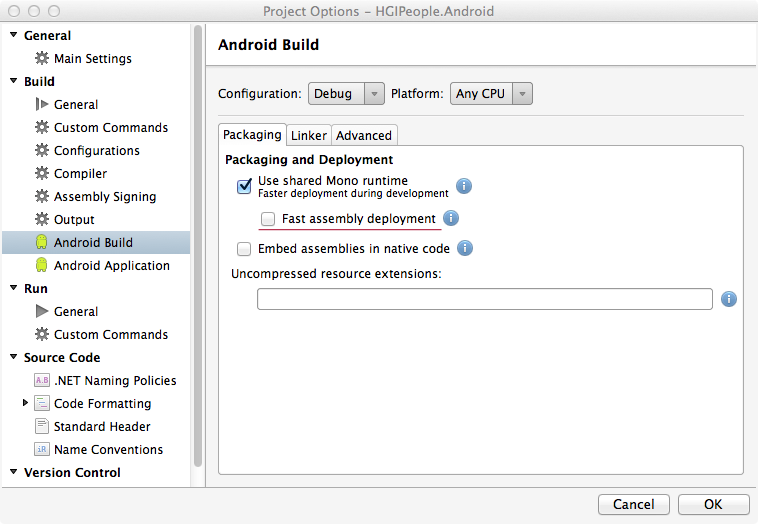
When deploying a Xamarin Android App to a device we were getting the error ' Deployment failed. Assembly synchronization error '.  Apparently this happens on Samsung devices with Knox  installed and to get around the problem you can uncheck ' Fast assembly deployment' in Xamarin Studio via the project options, a screenshot is below: The problem here, for us anyway, is that it then removes the existing package and reinstalls a new one every time.  As we're developing Apps using Xamarin bindings for Good Technologies Good Dynamics it then throws up the rather annoying email address / pin screen, as seen in the screen below every time we tried to update and deploy the App. During Good Dynamics development to get round this problem you just have to either use a non Knox/Samsung device or the standard SDK Emulators (as a side note Genymotion won't work with Good due to the lack of 386 support).   Ok it looks like this was a red herrin...

iOS AOT errors on device

If your application is running correctly in the iOS simulator but you see AOT errors on the device itself one possible fix is to enable generic value type sharing in the advanced tab of the iOS Build settings in Xamarin Studio. See the Xamarin docs (iOS specific enhancements section) for more details: http://docs.xamarin.com/releases/ios/xamarin.ios_6/xamarin.ios_6.4/

Developing Android Apps with Xamarin - Useful Links

Xamarin Docs - Android Resources http://docs.xamarin.com/guides/android/application_fundamentals/resources_in_android/part_4_-_creating_resources_for_varying_screens/ Android Asset Studio http://android-ui-utils.googlecode.com/hg/asset-studio/dist/index.html